
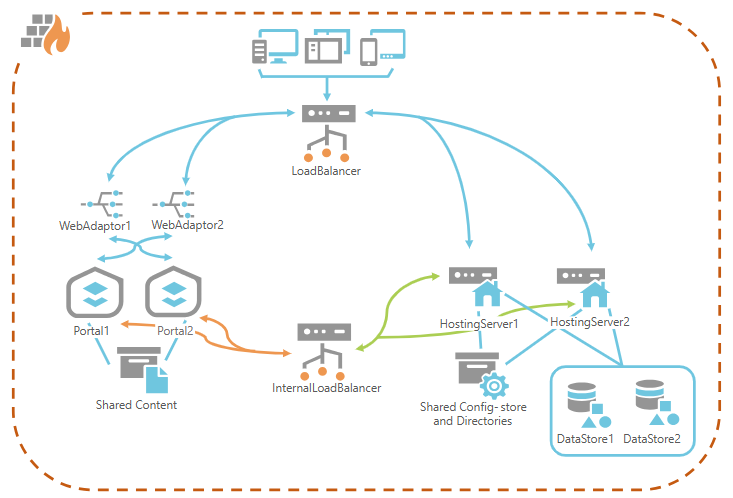
ArcGIS Enterprise Deployment Models: Architecture and Security Considerations
ArcGIS Enterprise offers flexible deployment models tailored to different organizational needs, IT environments, and security requirements. Whether you’re a government agency, NGO, or private enterprise, choosing the right model is essential for performance, scalability, and compliance in your GIS architecture.
1. Software as a Service (SaaS) – ArcGIS Online
- Managed by: Esri
- Best for: Organizations seeking a fully managed, cloud GIS solution.
Architecture Highlights:
- Hosted entirely by Esri
- Rapid deployment and scalability
- Ideal for self-service mapping, sharing, and lightweight analysis
Security Considerations:
- Data stored in Esri’s cloud; may not meet all sovereignty requirements
- Supports SAML, OpenID Connect, and built-in identity management
- FedRAMP, ISO 27001, SOC 2 certified
- Limited infrastructure control; patching and updates are handled by Esri
2. Platform as a Service (PaaS) – ArcGIS Location Platform
- Managed by: Esri (core services), user-managed integrations
- Best for: Developers building custom geospatial applications using APIs and services
Architecture Highlights:
- API-first approach
- Pay-as-you-go pricing
- Highly scalable and flexible
Security Considerations:
- API key management is critical to prevent unauthorized access
- Data encryption in transit and at rest is enforced
- Rate limiting and usage monitoring help prevent abuse
- Custom security layers must be implemented by developers
3. Virtual Machines (VMs) – Windows/Linux
- Managed by: Your organization
- Best for: Organizations with existing VM infrastructure or hybrid cloud/on-prem setups
Architecture Highlights:
- Full control over configuration and deployment
- Supports complex enterprise GIS workflows
- Compatible with AWS, Azure, and private clouds
Security Considerations:
- OS hardening and firewall configuration are your responsibility
- Role-based access control (RBAC) via Active Directory or LDAP
- TLS/SSL setup must be manually configured
- Audit logging and monitoring should be integrated with SIEM tools
- Patch management and regular vulnerability scans are essential
4. Kubernetes – Cloud-Native Deployment
- Managed by: Your organization
- Best for: Enterprises adopting modern DevOps and Kubernetes GIS deployment strategies
Architecture Highlights:
- Containerized microservices
- Automated scaling and self-healing
- Efficient resource utilization
Security Considerations:
- Use trusted images and scan for vulnerabilities
- Pod-level isolation and network policies are essential
- Secrets management via Kubernetes Secrets or external vaults
- Zero-trust architecture and service mesh (e.g., Istio) can enhance security
- Automated patching reduces human error and attack surface
Choosing the Right Model
Your choice should align with:
- IT principles and governance
- Staff expertise
- Security and compliance needs
- Integration requirements
- Scalability and performance goals
Many organizations adopt hybrid GIS strategies, combining SaaS for lightweight workflows and VM/Kubernetes deployments for mission-critical systems. This approach balances ease of use with control and customization.
General Security Best Practices Across All Models
- Enable HTTPS and encrypt data at rest
- Use enterprise identity providers and enforce least privilege access
- Implement logging, alerts, and regular audits
- Keep all components updated, especially in self-managed environments
- Ensure regular backups and test disaster recovery procedures
Conclusion
ArcGIS Enterprise provides a robust and adaptable platform for geospatial infrastructure. By understanding the strengths and security implications of each deployment model, organizations can make informed decisions that support their mission, protect their data, and scale effectively.